 RichTextBox
Font family dropdown in an ASP.NET Core rich text editor
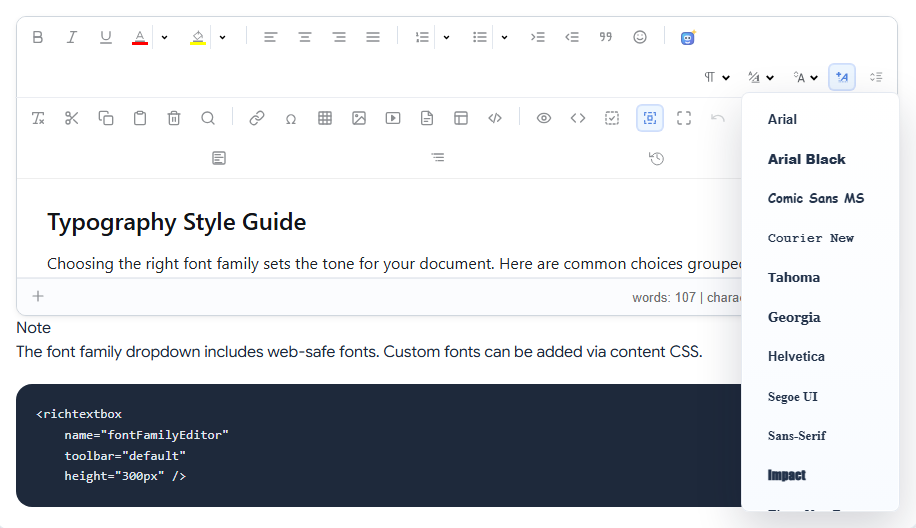
The font dropdown changes the typeface of the selected text. It is named fontname, and it is on the default and full toolbars.
Add it
<richtextbox name="Body"
             toolbar="{fontname,fontsize,bold,italic}|{undo,redo}"
             height="300px"></richtextbox>
The fonts it lists
Arial, Arial Black, Comic Sans MS, Courier New, Tahoma, Georgia, Helvetica, Segoe UI, Sans-Serif, Impact, Times New Roman and Verdana. These are fonts most computers have, so a reader sees what the writer chose.
Show your site's font while editing
Most sites want one font everywhere, and people should see it as they write. Set it for the editing area with a content stylesheet:
<richtextbox name="Body"
             toolbar="{bold,italic}|{insertlink}|{undo,redo}"
             content-css-url="/css/article.css"></richtextbox>
/* /css/article.css */
body { font-family: Georgia, serif; font-size: 18px; line-height: 1.6; }
Now the editor shows what readers will see. See content CSS.
Should people choose fonts at all?
A font chosen in the editor is saved in the document. It overrides your stylesheet, and it stays when you redesign your site. On most websites the better choice is to leave fontname out and let the stylesheet decide. Keep it for tools where the document's look belongs to the writer, such as a letter or a newsletter.