 RichTextBox
Font size dropdown in an ASP.NET Core rich text editor
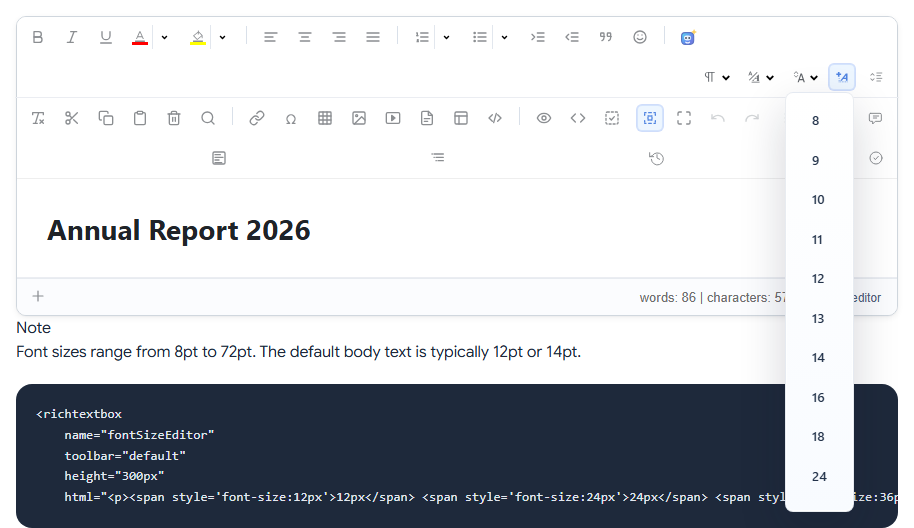
The size dropdown changes selected text to a chosen size. Its name is fontsize, and it is in the default and full toolbars.
Add it
<richtextbox name="Body"
             toolbar="{fontsize,bold,italic}|{undo,redo}"
             height="300px"></richtextbox>
The sizes it offers
8, 9, 10, 11, 12, 13, 14, 16, 18, 24, 36, 48, 60, 72 and 96.
What is saved
The size goes into the HTML with the text, as a style. So, like a font choice, it stays in that document, even if you later change your site's design.
Big text is not a heading
People often make a heading by choosing a large size. It looks right, but screen readers and search engines do not see a heading there, only large text. For titles, teach people to use the Paragraphs dropdown. If that is what your users need most, give them that and leave fontsize out:
<richtextbox name="Body"
             toolbar="{paragraphs,bold,italic}|{insertlink}|{undo,redo}"></richtextbox>
When size is the right tool
Fine print, a large number in a newsletter, or a caption: a one-off change that is not a section title. For a tool where people design letters or flyers, keeping it makes sense.