 RichTextBox
Headings dropdown in an ASP.NET Core rich text editor
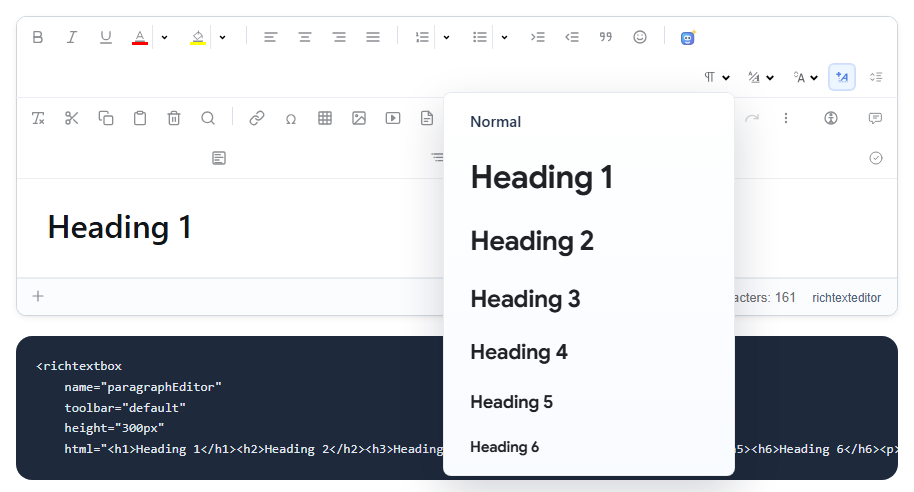
Headings give a document its structure. In RichTextBox, the Paragraphs dropdown, named paragraphs, offers Normal and Heading 1 to Heading 6. It is in the default and full toolbars.
Add it
<richtextbox name="Body"
             toolbar="{paragraphs,bold,italic}|{undo,redo}"
             height="300px"></richtextbox>
Put the caret in a paragraph, open the dropdown and choose. It changes the whole paragraph. The saved HTML uses real tags: <h2>, <p>.
Why real headings matter
- Screen readers let people jump between headings, and that only works with real heading tags.
- Search engines read them to understand what a page is about.
- Word export turns them into Word's heading styles, so a table of contents works there.
Which level to use
Your page template usually has its own <h1> for the title. A page should have one, so inside an article people should start at Heading 2 and not skip levels. A short note under the toolbar can save a lot of editing later. The editor's accessibility checker also reports skipped levels.
Style them with your CSS
Headings saved this way follow your site's stylesheet, so a redesign restyles every old article at once. Use content CSS to show the same look while writing.
Typing shortcuts
People who like Markdown can type ## at the start of a line, or use slash commands to pick a heading without touching the toolbar.