 RichTextBox
Slash commands in an ASP.NET Core rich text editor
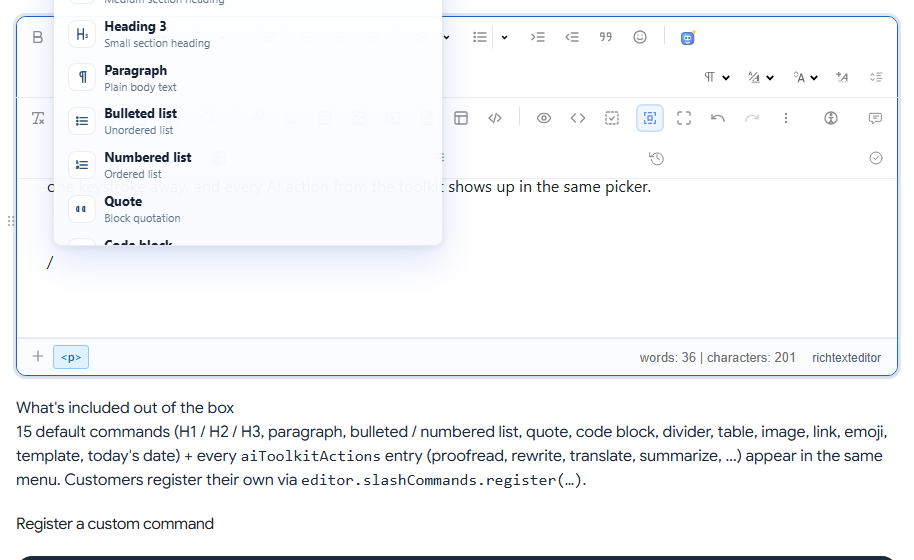
Fast writers do not want to reach for a toolbar. Slash commands bring up a menu right at the caret: type / on a new line, filter as you type, and press Enter.
Turn it on
<richtextbox id="slashEditor" name="Body"
             toolbar="default"
             height="360px"
             enable-slash-commands="true"></richtextbox>
What is in the menu
Headings, paragraph, bulleted and numbered lists, quote, code block, divider, table, image, link, emoji, template and today's date. If you use the AI toolkit, its actions appear as well, and slash-command-include-ai="false" keeps them out.
Add your own command
var editor = window.richTextBoxEditors.slashEditor;

editor.slashCommands.register({
    id: "call-to-action",
    section: "Custom",
    title: "Call to action",
    action: function (ed) {
        ed.insertHTML('<p class="cta"><a href="/signup">Sign up today</a></p>');
    }
});
This is a good way to offer your own content blocks, without adding more toolbar buttons. The demo shows a working custom command, so check the exact fields there.
Discoverable?
Nothing on the screen tells people that this exists, so mention it in a hint below the editor, or show it during onboarding. Keep the toolbar as well: slash commands are a shortcut, and they do not replace the buttons for people who do not know the trick.
Mentions
The same kind of picker handles @mentions.