 RichTextBox
Add @mentions to an ASP.NET Core rich text editor
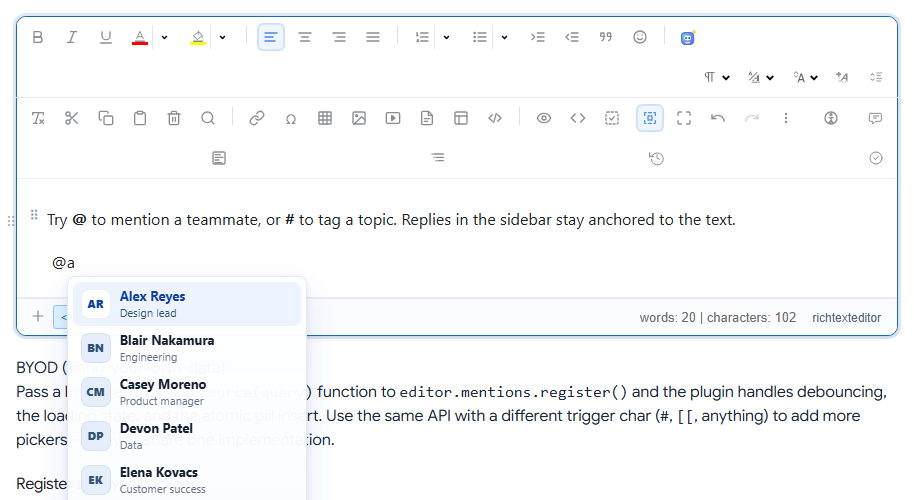
Typing @ to pick a person is now what everyone expects, from chat apps and documents alike. RichTextBox has a mention picker that filters as you type, loads names from your own API and inserts a mention that deletes as one unit.
Turn it on
<richtextbox id="mentionEditor" name="Body"
             toolbar="default"
             height="320px"
             enable-mentions="true"></richtextbox>
Connect it to your users
Register a source in JavaScript. It takes what the user typed and returns a list:
var editor = window.richTextBoxEditors.mentionEditor;

editor.mentions.register({
    trigger: "@",
    source: function (query) {
        return fetch("/api/users?q=" + encodeURIComponent(query))
            .then(function (r) { return r.json(); })
            .then(function (rows) {
                return rows.map(function (u) {
                    return { id: u.id, label: u.name, subtitle: u.title, avatarUrl: u.avatar };
                });
            });
    }
});
Because the editor may still be starting up when your script runs, the mentions demo waits for editor.mentions to exist before registering.
The API
app.MapGet("/api/users", async (string? q, AppDbContext db) =>
{
    var term = q ?? "";
    return await db.Users
        .Where(u => u.Name.Contains(term))
        .OrderBy(u => u.Name)
        .Take(10)
        .Select(u => new { id = u.Id, name = u.Name, title = u.JobTitle, avatar = u.AvatarUrl })
        .ToListAsync();
}).RequireAuthorization();
RequireAuthorization matters here, and so does the small Take. Otherwise this endpoint would hand your staff list to anyone who asks.
More than people
The same call adds other triggers, so # can tag a topic. Each trigger has its own source.
Telling people they were mentioned
A mention in the text does not send anything by itself. To notify, read the mentions from the HTML on the server when the document is saved, then send your own message. Look only at documents that passed through the cleaner, and check that the person sending has the right to reach the person mentioned.