 RichTextBox
Track changes in an ASP.NET Core rich text editor
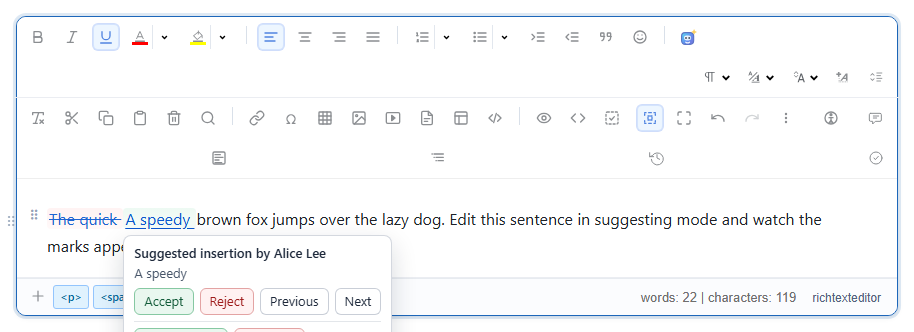
When several people work on a document, you need to see who changed what, and decide what to keep. Track changes in RichTextBox works the way Word's does: additions are underlined, deletions are struck through, and nothing is final until someone accepts it.
Turn it on
<richtextbox name="Draft"
             toolbar="default"
             enable-tracked-changes="true"
             current-user-id="@User.Identity?.Name"
             current-user-name="@User.FindFirst(ClaimTypes.GivenName)?.Value"
             current-user-color="#2563eb"></richtextbox>
The author comes from your signed-in user, so changes carry the right name without another login. trackchanges is the toolbar button, and it is in the default and full toolbars.
Accept and reject from code
The toolbar offers these to users. Your own workflow can call them as well:
var editor = window.richTextBoxEditors.Draft;

editor.trackedChanges.enable({ id: "alice", name: "Alice Lee", color: "#2563eb" });
editor.trackedChanges.list();
editor.trackedChanges.accept(entryId);
editor.trackedChanges.reject(entryId);
editor.trackedChanges.acceptAll({ author: "alice" });
editor.trackedChanges.rejectAll({ author: "alice" });
editor.trackedChanges.disable();
What is saved
A tracked change is part of the document's HTML, as a marked span with the author's details, so saving the HTML saves the pending changes too. Keep that in mind in two places:
- Publishing. Accept or reject everything first, or readers would see the marks. A publish step that calls
acceptAllis a simple rule. - Cleaning. Check that your sanitizer policy keeps the marks.
[RichTextHtml]uses the editor's own rules, but test it with your own settings before relying on it.
Who may accept?
The browser cannot enforce that. Someone could post any HTML they like. If only some people may approve changes, make that a separate action in your application, where your code checks the role, and keep a copy of what was approved.
Try it
In the track changes demo, pick an author, turn on suggesting and type. Then see comments and revision history, which work alongside it.