 RichTextBox
Add comments to an ASP.NET Core rich text editor
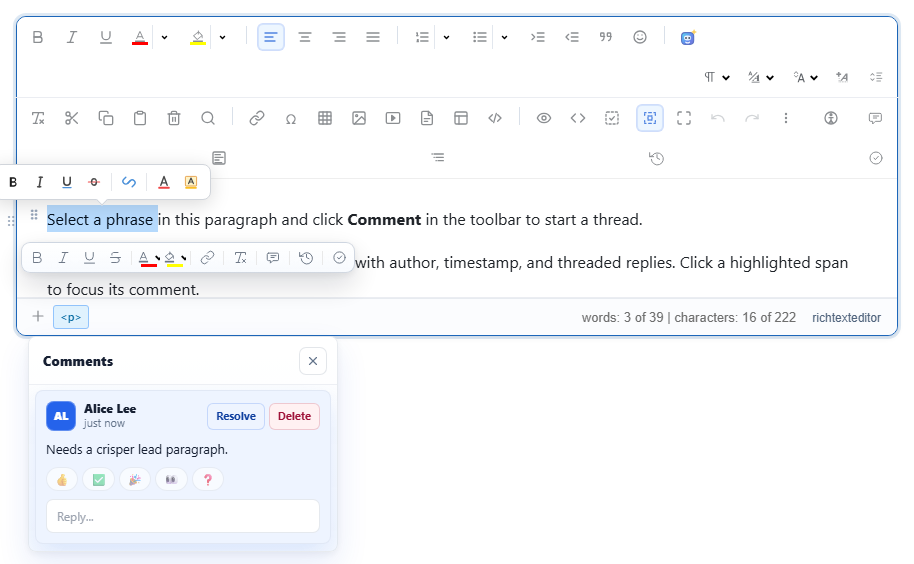
Reviewers need to say "this sentence is wrong" without changing the sentence. Comments in RichTextBox attach a thread to the selected text, with replies, resolve and delete, in a comments panel that opens with the editor.
Turn it on
<richtextbox name="Article"
             toolbar="default"
             enable-comments="true"
             current-user-id="@User.Identity?.Name"
             current-user-name="@User.FindFirst(ClaimTypes.GivenName)?.Value"
             current-user-color="#2563eb"></richtextbox>
Select some text and press the comment button. The name on each comment comes from your signed-in user.
Work with comments from code
var editor = window.richTextBoxEditors.Article;

editor.comments.add({ text: "Needs a crisper lead paragraph." });   // uses the current selection
editor.comments.reply(commentId, "Agreed. Let me take a pass.");
editor.comments.resolve(commentId);
editor.comments.delete(commentId);
editor.comments.list({ status: "pending" });
editor.comments.openSidebar();
What is saved
The highlighted text stays in the document's HTML, tied to a comment id. Comment threads travel in the editor's review ledger with tracked changes and AI suggestions. Two things follow from that:
- Keep the review ledger with the document, not just the HTML, if comments must survive a reload.
- Before publishing, resolve or remove comments, so no highlights reach your readers.
Notify people
RichTextBox shows comments, and your application decides about notifications. To email people when they are mentioned, combine this with @mentions and your own mail code, on the server, when the document is saved.
Comments in Word
Comments in the document reach a Word file when it is exported with the exportdocx button, so a reviewer without access to your site can still see them.
Try it
Open the comments demo, select a sentence and add one.