 RichTextBox
Insert and edit tables in an ASP.NET Core rich text editor
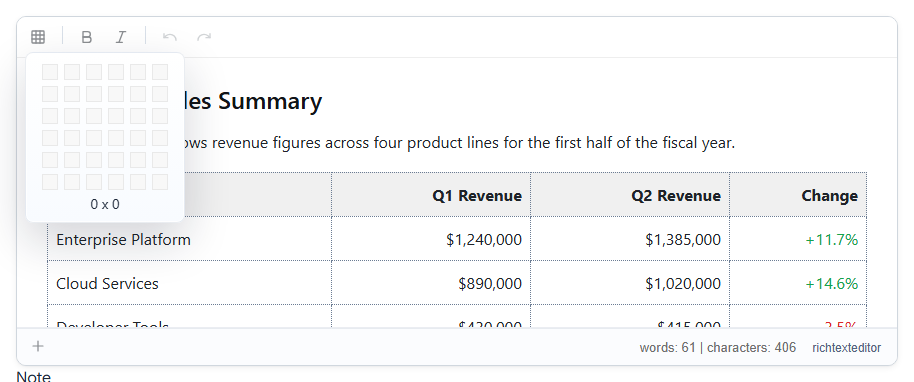
Tables are the part of an editor people try hardest to break: comparison lists, price lists and data pasted from Excel. RichTextBox has a table button and a right-click menu for rows and columns.
Add the button
inserttable is in the default and full toolbars. In your own:
<richtextbox name="Body"
             toolbar="{inserttable}|{bold,italic}|{undo,redo}"
             height="350px"
             enable-context-menu="true"
             context-menu-mode="Default"></richtextbox>
enable-context-menu is what gives people the right-click menu inside a table, which is where most table editing happens.
What people can do
- Choose the rows and columns when inserting.
- Add and delete rows and columns.
- Merge and split cells.
- Paste a table from Word or Excel and keep its structure.
See the table operations demo for the rest.
Tables in saved HTML
A table saves as ordinary <table> markup, which [RichTextHtml] keeps. Your page's own CSS decides how it looks to readers, and that is a common surprise: a table with borders in the editor can look bare on the published page if your stylesheet has no rules for it. Add a few for the class you show content in:
.article table { border-collapse: collapse; width: 100%; }
.article th, .article td { border: 1px solid #c4c7c5; padding: .5rem .75rem; }
Wide tables on phones
A wide table is the most common reason a page scrolls sideways on a phone. Give it its own scrolling area when you show it:
.article .table-wrap { overflow-x: auto; }
Tables to Word
Tables survive export to Word, and they come in with paste from Word, so a document can move in both directions.