 RichTextBox
Customize the rich text editor toolbar in ASP.NET Core
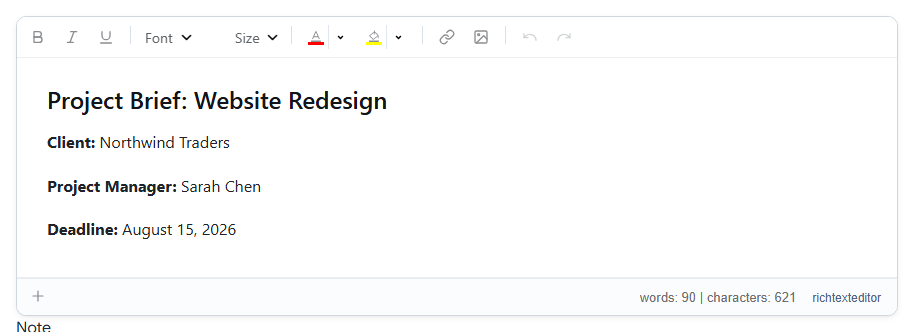
A comment box does not need sixty buttons. A short toolbar is easier to use, and it keeps people from producing content that does not fit your site. In RichTextBox, the toolbar attribute takes a preset name or your own list.
The presets
<richtextbox name="Body" toolbar="default"></richtextbox>
| Preset | Good for |
|---|---|
basic | Comments and short text: bold, italic, link, image, emoji |
default | Most editing, with tables, files, find and the review tools |
full | The longest list, adding the gallery, footnotes, merge fields and table menus |
mobile, office | A phone-sized toolbar, and an Office-style one |
Your own list
Name the buttons you want, in groups:
<richtextbox name="Body"
             toolbar="{bold,italic,underline}|{fontname,fontsize}|{forecolor,backcolor}|{insertlink,insertimage}|{undo,redo}"
             height="300px"></richtextbox>
- Curly braces make a group of buttons.
|puts a separator between groups.- In longer toolbars,
/starts a new row.
Names people look for
| You want | Name |
|---|---|
| Bold, italic, underline, strikethrough | bold, italic, underline, strike |
| Headings and paragraph style | paragraphs |
| Font, size, colours | fontname, fontsize, forecolor, backcolor |
| Lists, checklist | insertorderedlist, insertunorderedlist, inserttodolist |
| Link, picture, gallery | insertlink, unlink, insertimage, insertgallery |
| Video, file, table, code block | insertvideo, insertdocument, inserttable, insertcode |
| Find, HTML source, full screen | find, code, fullscreenenter |
| Clear formatting, format painter | removeformat, formatpainter |
| Word and PDF | importdocument, exportdocx, exportpdf |
The toolbar reference lists them all.
Different toolbars for different people
The value can come from your code:
<richtextbox asp-for="Body"
             toolbar="@(User.IsInRole("Editor") ? "full" : "basic")"></richtextbox>
Removing a button makes the editor simpler, but it is not security. Someone can still paste any HTML or post your form by hand. To control what is stored, clean the HTML on the server, and to control who can upload, use a policy.