 RichTextBox
Change case: uppercase and lowercase in an ASP.NET Core editor
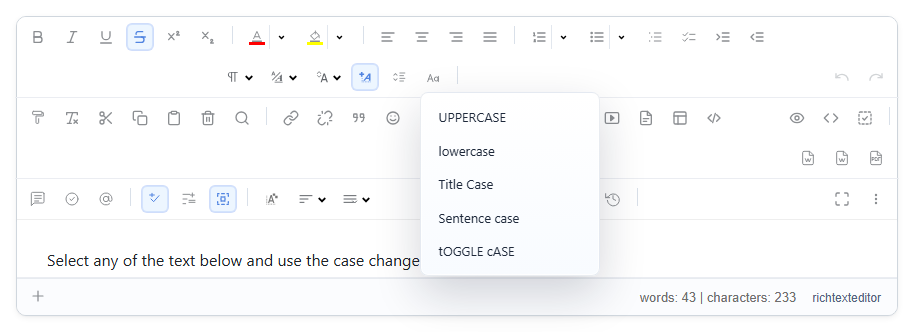
Text arrives in capitals because someone pasted it from an old system or left Caps Lock on. Retyping it is a waste of time. The casechange dropdown fixes it. You add it to your own toolbar. The More panel of every preset also has separate ucase, lcase and titlecase buttons.
Add it
<richtextbox name="Body"
             toolbar="{casechange,bold,italic}|{undo,redo}"
             height="300px"></richtextbox>
The options
- UPPERCASE
- lowercase
- Title Case
- Sentence case
- tOGGLE cASE, for text typed with Caps Lock on by mistake
Select the text and choose. The letters themselves change, so the result is saved as you see it, and it is not a CSS effect that disappears elsewhere.
Undo
Undo takes it back. That matters for uppercase, which throws away information: once text is all capitals, the editor cannot know which letters were capitals before, so Sentence case will not restore names like "London". Use Undo for that, or proofread after converting.
Capitals for headings
If all your headings should look capitalized, do not convert them. Use CSS on your site, which keeps the real text intact for search engines and screen readers:
.article h2 { text-transform: uppercase; }