 RichTextBox
How to upload images in an ASP.NET Core rich text editor
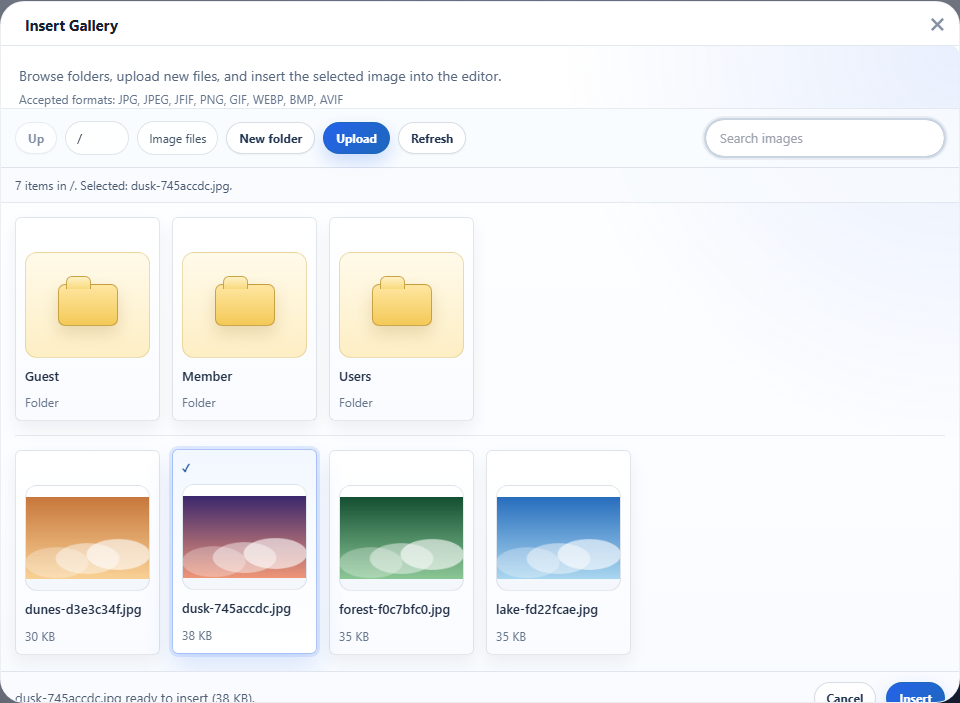
Your users want to add a picture to what they are writing, and the picture has to end up on your server. With RichTextBox for ASP.NET Core you do not write an upload controller. The package maps the endpoint, checks the file and returns its address to the editor.
Set it up
Install the package, then add two lines to Program.cs:
builder.Services.AddRichTextBox();

var app = builder.Build();
app.UseStaticFiles();
app.MapRichTextBoxUploads();   // POST /richtextbox/upload and the gallery
Import the Tag Helper in _ViewImports.cshtml and put the editor on a page:
@addTagHelper *, RichTextBox

<richtextbox name="Body" toolbar="default" height="400px"></richtextbox>
That is all. The Insert Image button can now upload, and so can dragging or pasting a picture.
Where the files go
By default files are stored in wwwroot/uploads and served from /uploads. Each file gets a generated suffix, such as logo-9c4f2e8a3.png, so two people uploading logo.png do not overwrite each other. To change the place:
builder.Services.AddRichTextBox(options =>
{
    options.UploadWebPath = "/media";
    options.UploadPhysicalPath = @"D:\site-media";
});
A folder outside wwwroot also needs a static file mapping of your own, so the web server can serve it at that address. To use cloud storage instead, see S3 and Azure uploads.
The limits you can change
| Option | Default | What it does |
|---|---|---|
MaxUploadBytes | 4 MB | Largest file |
MaxUploadBytesByExtension | Empty | A different limit for one file type |
AllowedImageExtensions | jpg, jpeg, png, gif, webp | Which pictures are accepted |
MaxImagePixels | 100 million | Refuses an image that would decode to a huge bitmap |
StripImageMetadata | true | Removes EXIF, GPS and camera data |
What happens when an upload is refused
The endpoint answers with ERROR: and the reason, and nothing is stored. A script named photo.jpg, for example, gets "file content does not match extension". The article on secure file upload goes through every check.
Before you go live
As mapped above, anyone who can reach your site can upload. Add your own policy with one chained call: restrict who can upload.